
Check Internet Usage
Login with your ADSL or Dialup username and password eg. username@australisit.net
The link below opens a new window with javascript. This usage meter is a summary meter & may be out by up to 24 hours.
For Real Time usage, log into My Account
REMEMBER: Your ADSL or Dialup username is not your email address. Your ADSL or Dialup Username normally ends with @australisit.net
The link below opens a new window with javascript. This usage meter is a summary meter & may be out by up to 24 hours. For real Time usage, log into My Account

About the Usage Meter
Daily Usage
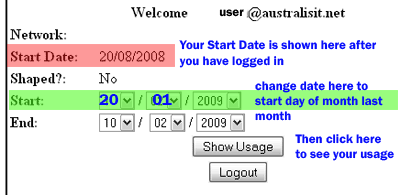
The report splits daily usage into peak upload and download; offpeak upload and download. Offpeak usage is measured between the hours of 1am to 8am AEDST. The report is updated once every 24 hours. Totals for each category over a selected period are listed at the bottom of each column. To see your usage this month, enter your anniversary date in the "Start" field. See the screen shot below to see where to find this info.
Shaped Plans
Shaped plans apply speed shaping once download quota is exceeded within the monthly usage cycle. Usage for shaped plans is measured in monthly cycles from the "Start Date" listed on the report.
Peak / Off Peak Plans
We have anumber of different Peak/Off-Peak plans. For example the 30/30 plan range offers 30 GB peak, and 30 GB offpeak data. If offpeak data allowance is exceeded, the excess will dip into the peak data allowance. All plans are speed shaped after the peak data allowance has been reached.
Remember to check your usage from your anniversary date, not the 1st of the month, &
remember that your account username has @australisit.net at the end of it